
Roles, and who can do what
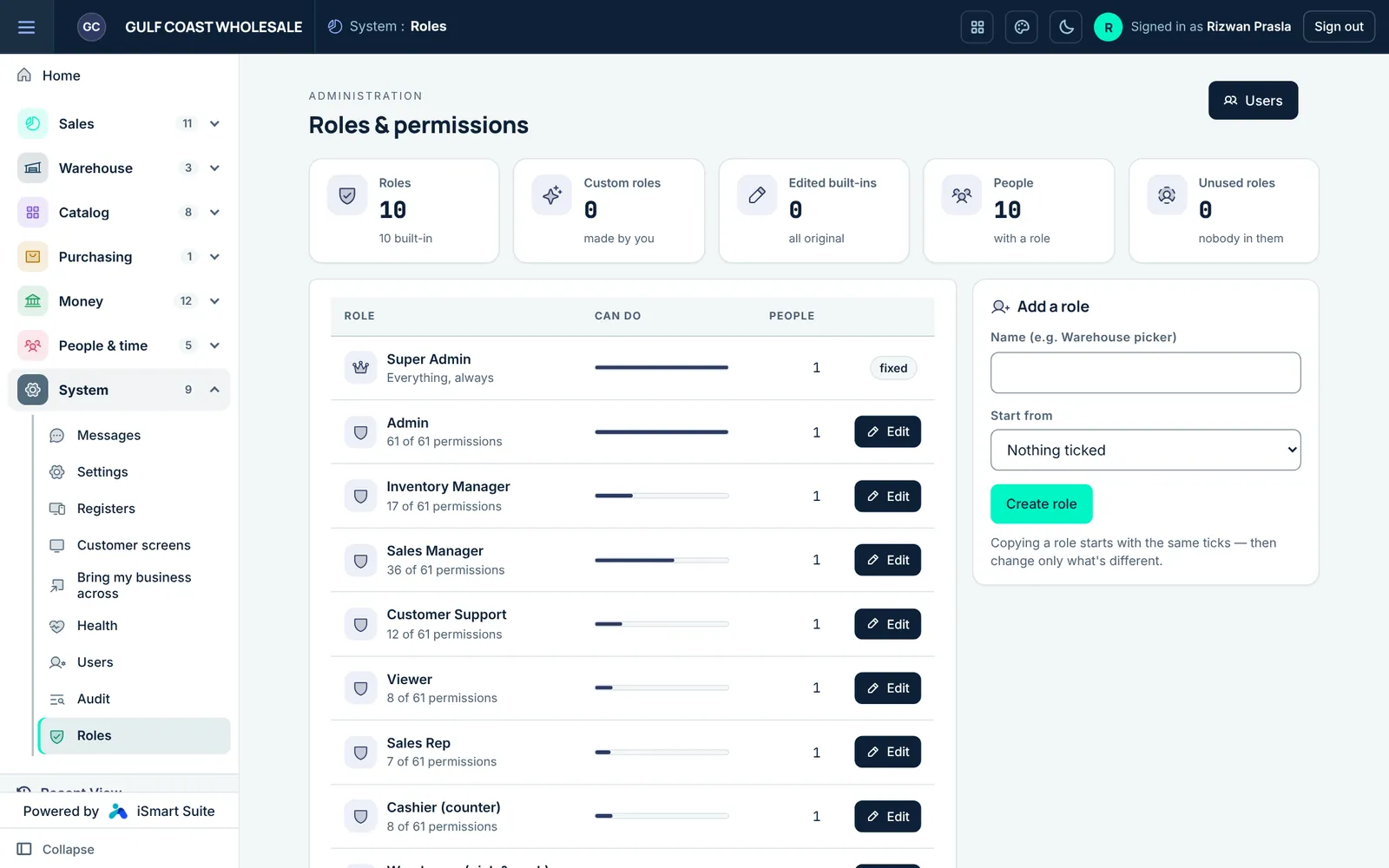
Every person who signs in has one role. The role decides which screens they see and what they may change. These are the built-in roles as they come; an admin can edit any of them, or add new ones, under System → Roles.
Built-in roles
9 roles| Role | Name in the app | Screens | Permissions |
|---|---|---|---|
| Owner / AdminRuns the company account: everything, including costs and money. | Super Admin or Admin | 58 | 61 of 61 |
| Inventory managerBuying, stock, receiving and costs. | Inventory Manager | 11 | 17 of 61 |
| Sales managerCustomers, pricing and the sales team. Cannot see cost. | Sales Manager | 29 | 36 of 61 |
| Sales repTakes orders, visits stores. Cannot see cost. | Sales Rep | 5 | 7 of 61 |
| Counter / cashierThe till, the drawer and walk-in customers. | Cashier (counter) | 8 | 8 of 61 |
| WarehousePicking and packing. | Warehouse (pick & pack) | 4 | 5 of 61 |
| DriverThe delivery round. | Driver | 4 | 3 of 61 |
| Customer supportAnswers customers, chases unpaid invoices. | Customer Support | 9 | 12 of 61 |
| ViewerRead-only. Reports and lists, no changes. | Viewer | 6 | 8 of 61 |
Owner / Admin
In the app: Super Admin or Admin · 61 of 61 permissions
The person who runs the company account. Sees every screen, including cost and money, and is the only one who can change settings, users and roles.
Give it to as few people as you can. Turn on two-step sign-in for each of them.
Screens this role usually works in
- Home
- Home
- Sales
- Take order, Store requests, Counter, Register tickets, Kitchen, After the outage, Returns, Invoices, Orders, Customers, Collections, Reps, Trading month
- Warehouse
- Pick, Delivery, Stock
- Catalog
- Catalog, Products, Price Book, Promos, Storefront slides, Storefront look, Item options, EBT items
- Purchasing
- Buying
- Money
- Drawer, POS Live, Close the day, Expenses, Budgets, Receipts, Tobacco, Fuel, Lottery, Lottery money, Reports, Accounting, Books, Checks, Rebates
- People & time
- Clock, Timesheets, Schedule, Payroll, Hiring
- System
- Messages, Settings, Features, Registers, Import templates, Legal & privacy, Customer screens, Bring my business across, Users, Roles, Audit, Health
Inventory manager
In the app: Inventory Manager · 17 of 61 permissions
Buys the stock and looks after it. Works in Catalog, Purchasing and Warehouse, and can see cost.
Cannot raise invoices, take payments or see customers’ accounts.
Screens this role usually works in
- Home
- Home
- Warehouse
- Pick, Stock
- Catalog
- Catalog, Products, Price Book
- Purchasing
- Buying
- Money
- Receipts, Reports
- People & time
- Clock
- System
- Import templates
Everything this role may do (17)
- Products
- See products. Edit products. See the catalog. Edit the catalog. Make barcodes.
- Warehouse
- Pick and pack orders. Pack with a short or unscanned line (manager override).
- Stock
- See stock. Adjust stock. Manage warehouses.
- Buying
- See vendors and purchase orders (and costs). Create, email and receive purchase orders.
- Money
- See reports and sales by employee. See scanned receipts and invoices. Scan and attach receipts and invoices.
- Staff time
- Clock in and out, see own hours and published schedule.
- Admin
- Change own password and two-step sign-in.
Sales manager
In the app: Sales Manager · 36 of 61 permissions
Runs sales and the counter. Works with customers, orders, invoices, payments, promotions, returns, delivery routes and the cash drawers.
Cannot see what you pay for stock, and cannot change users, roles or settings.
Screens this role usually works in
- Home
- Home
- Sales
- Take order, Store requests, Counter, Register tickets, Kitchen, After the outage, Returns, Invoices, Orders, Customers, Collections, Reps, Trading month
- Warehouse
- Delivery, Stock
- Catalog
- Promos
- Money
- Drawer, POS Live, Close the day, Expenses, Receipts, Tobacco, Fuel, Lottery, Lottery money, Reports
- People & time
- Clock
- System
- Messages
Everything this role may do (36)
- Invoices
- See invoices. Create invoices and confirm orders. Post invoices. Record payments. Download EDI files.
- Orders
- See orders. See every order (without this, only orders they took themselves). Take and cancel orders (incl. field sales).
- Lottery
- Count the lottery bins at shift change. Book in packs, switch them on, and settle with the state.
- Counter
- Use the counter POS. See every cashier's till report. Take returns and give refunds. Open and close their own cash drawer. See every cashier's drawer close-outs.
- Customers
- Read customer messages. Reply to and start customer messages. See customers. Edit customers. Set customer prices, promotions and bulk price changes. Verify tobacco/vape permits.
- Products
- See products. See the catalog. Make barcodes.
- Delivery
- Plan routes and assign drivers. Run own deliveries and take proof of delivery.
- Stock
- See stock.
- Money
- See expenses. Enter expenses. Approve expenses. See reports and sales by employee. See scanned receipts and invoices. Scan and attach receipts and invoices.
- Staff time
- Clock in and out, see own hours and published schedule.
- Admin
- See settings. Change own password and two-step sign-in.
Sales rep
In the app: Sales Rep · 7 of 61 permissions
Visits or phones stores and takes their orders.
Sees only the customers assigned to them and only the orders they took. No invoices, no payments, no cost.
Screens this role usually works in
- Home
- Home
- Sales
- Take order, Orders, Customers
- People & time
- Clock
Everything this role may do (7)
- Orders
- See orders. Take and cancel orders (incl. field sales).
- Customers
- See customers.
- Products
- See products.
- Stock
- See stock.
- Staff time
- Clock in and out, see own hours and published schedule.
- Admin
- Change own password and two-step sign-in.
Counter / cashier
In the app: Cashier (counter) · 8 of 61 permissions
Rings up walk-in customers and looks after one cash drawer.
Sees only their own till. Cannot give refunds or change prices.
Screens this role usually works in
- Home
- Home
- Sales
- Counter, Register tickets, Customers
- Money
- Drawer, Close the day, Lottery
- People & time
- Clock
Everything this role may do (8)
- Lottery
- Count the lottery bins at shift change.
- Counter
- Use the counter POS. Open and close their own cash drawer.
- Customers
- See customers.
- Products
- See products.
- Stock
- See stock.
- Staff time
- Clock in and out, see own hours and published schedule.
- Admin
- Change own password and two-step sign-in.
Warehouse
In the app: Warehouse (pick & pack) · 5 of 61 permissions
Picks and packs orders.
Sees products and stock, but no prices and no money.
Screens this role usually works in
Everything this role may do (5)
- Products
- See products.
- Warehouse
- Pick and pack orders.
- Stock
- See stock.
- Staff time
- Clock in and out, see own hours and published schedule.
- Admin
- Change own password and two-step sign-in.
Driver
In the app: Driver · 3 of 61 permissions
Runs the delivery route they are given and records each delivery.
Sees only their own routes. Nothing else in the console.
Screens this role usually works in
- Home
- Home
- Warehouse
- Delivery, My deliveries
- People & time
- Clock
Everything this role may do (3)
- Delivery
- Run own deliveries and take proof of delivery.
- Staff time
- Clock in and out, see own hours and published schedule.
- Admin
- Change own password and two-step sign-in.
Customer support
In the app: Customer Support · 12 of 61 permissions
Answers stores: looks up orders and invoices, takes an order for someone on the phone, replies to messages.
Cannot post an invoice, record a payment or edit a customer.
Screens this role usually works in
- Home
- Home
- Sales
- Take order, Store requests, Invoices, Orders, Customers, Collections
- People & time
- Clock
- System
- Messages
Everything this role may do (12)
- Invoices
- See invoices.
- Orders
- See orders. See every order (without this, only orders they took themselves). Take and cancel orders (incl. field sales).
- Customers
- Read customer messages. Reply to and start customer messages. See customers.
- Products
- See products. See the catalog.
- Stock
- See stock.
- Staff time
- Clock in and out, see own hours and published schedule.
- Admin
- Change own password and two-step sign-in.
Viewer
In the app: Viewer · 8 of 61 permissions
Looks, and changes nothing. Useful for an accountant or a partner.
Read-only: products, stock, customers, orders, invoices and reports.
Screens this role usually works in
Everything this role may do (8)
- Invoices
- See invoices.
- Orders
- See orders. See every order (without this, only orders they took themselves).
- Customers
- See customers.
- Products
- See products.
- Stock
- See stock.
- Money
- See reports and sales by employee.
- Admin
- Change own password and two-step sign-in.
The full permission table
One row for each thing a role can be allowed to do, as the built-in roles come. A filled square means allowed.
| Permission | Owner / Admin | Inventory manager | Sales manager | Sales rep | Counter / cashier | Warehouse | Driver | Customer support | Viewer |
|---|---|---|---|---|---|---|---|---|---|
| Invoices | |||||||||
| See invoices | Yes | No | Yes | No | No | No | No | Yes | Yes |
| Create invoices and confirm orders | Yes | No | Yes | No | No | No | No | No | No |
| Post invoices | Yes | No | Yes | No | No | No | No | No | No |
| Void invoices | Yes | No | No | No | No | No | No | No | No |
| Record payments | Yes | No | Yes | No | No | No | No | No | No |
| Override a customer credit limit | Yes | No | No | No | No | No | No | No | No |
| Download EDI files | Yes | No | Yes | No | No | No | No | No | No |
| Orders | |||||||||
| See orders | Yes | No | Yes | Yes | No | No | No | Yes | Yes |
| See every order (without this, only orders they took themselves) | Yes | No | Yes | No | No | No | No | Yes | Yes |
| Take and cancel orders (incl. field sales) | Yes | No | Yes | Yes | No | No | No | Yes | No |
| Lottery | |||||||||
| Count the lottery bins at shift change | Yes | No | Yes | No | Yes | No | No | No | No |
| Book in packs, switch them on, and settle with the state | Yes | No | Yes | No | No | No | No | No | No |
| Counter | |||||||||
| Use the counter POS | Yes | No | Yes | No | Yes | No | No | No | No |
| See every cashier's till report | Yes | No | Yes | No | No | No | No | No | No |
| Take returns and give refunds | Yes | No | Yes | No | No | No | No | No | No |
| Open and close their own cash drawer | Yes | No | Yes | No | Yes | No | No | No | No |
| See every cashier's drawer close-outs | Yes | No | Yes | No | No | No | No | No | No |
| Customers | |||||||||
| Read customer messages | Yes | No | Yes | No | No | No | No | Yes | No |
| Reply to and start customer messages | Yes | No | Yes | No | No | No | No | Yes | No |
| See customers | Yes | No | Yes | Yes | Yes | No | No | Yes | Yes |
| Edit customers | Yes | No | Yes | No | No | No | No | No | No |
| Set customer prices, promotions and bulk price changes | Yes | No | Yes | No | No | No | No | No | No |
| Verify tobacco/vape permits | Yes | No | Yes | No | No | No | No | No | No |
| Products | |||||||||
| See products | Yes | Yes | Yes | Yes | Yes | Yes | No | Yes | Yes |
| Edit products | Yes | Yes | No | No | No | No | No | No | No |
| See the catalog | Yes | Yes | Yes | No | No | No | No | Yes | No |
| Edit the catalog | Yes | Yes | No | No | No | No | No | No | No |
| Make barcodes | Yes | Yes | Yes | No | No | No | No | No | No |
| Warehouse | |||||||||
| Pick and pack orders | Yes | Yes | No | No | No | Yes | No | No | No |
| Pack with a short or unscanned line (manager override) | Yes | Yes | No | No | No | No | No | No | No |
| Delivery | |||||||||
| Plan routes and assign drivers | Yes | No | Yes | No | No | No | No | No | No |
| Run own deliveries and take proof of delivery | Yes | No | Yes | No | No | No | Yes | No | No |
| Stock | |||||||||
| See stock | Yes | Yes | Yes | Yes | Yes | Yes | No | Yes | Yes |
| Adjust stock | Yes | Yes | No | No | No | No | No | No | No |
| Manage warehouses | Yes | Yes | No | No | No | No | No | No | No |
| Buying | |||||||||
| See vendors and purchase orders (and costs) | Yes | Yes | No | No | No | No | No | No | No |
| Create, email and receive purchase orders | Yes | Yes | No | No | No | No | No | No | No |
| Money | |||||||||
| See expenses | Yes | No | Yes | No | No | No | No | No | No |
| Enter expenses | Yes | No | Yes | No | No | No | No | No | No |
| Approve expenses | Yes | No | Yes | No | No | No | No | No | No |
| See budgets | Yes | No | No | No | No | No | No | No | No |
| Edit budgets | Yes | No | No | No | No | No | No | No | No |
| See reports and sales by employee | Yes | Yes | Yes | No | No | No | No | No | Yes |
| Export to QuickBooks | Yes | No | No | No | No | No | No | No | No |
| See profit & loss reports | Yes | No | No | No | No | No | No | No | No |
| Staff time | |||||||||
| Clock in and out, see own hours and published schedule | Yes | Yes | Yes | Yes | Yes | Yes | Yes | Yes | No |
| See, edit, approve and lock everyone's timesheets and tips | Yes | No | No | No | No | No | No | No | No |
| Build and publish the shift schedule | Yes | No | No | No | No | No | No | No | No |
| Money | |||||||||
| See scanned receipts and invoices | Yes | Yes | Yes | No | No | No | No | No | No |
| Scan and attach receipts and invoices | Yes | Yes | Yes | No | No | No | No | No | No |
| Use the books: chart of accounts, journal entries, bank reconciliation and financial statements | Yes | No | No | No | No | No | No | No | No |
| Payroll | |||||||||
| Print and void checks for employees, vendors and customers | Yes | No | No | No | No | No | No | No | No |
| Customers | |||||||||
| Set up and pay quarterly sales rebates | Yes | No | No | No | No | No | No | No | No |
| Payroll | |||||||||
| Run payroll, edit pay rates and tax settings, print pay stubs and payroll worksheets | Yes | No | No | No | No | No | No | No | No |
| Admin | |||||||||
| See settings | Yes | No | Yes | No | No | No | No | No | No |
| Change settings | Yes | No | No | No | No | No | No | No | No |
| See users | Yes | No | No | No | No | No | No | No | No |
| Add and edit users | Yes | No | No | No | No | No | No | No | No |
| Edit roles and permissions (super admin only can grant this) | Yes | No | No | No | No | No | No | No | No |
| Change own password and two-step sign-in | Yes | Yes | Yes | Yes | Yes | Yes | Yes | Yes | Yes |
| See the audit log (who changed what) | Yes | No | No | No | No | No | No | No | No |
Owner / Admin is shown with everything. Only a Super Admin can let another role edit roles and permissions.