
Set up departments, categories, price groups and brands
The four lists everything else hangs off — and the one setting that keeps you legal.
For: Owner / Admin, Inventory manager, Sales manager · about 10 minutes
Step by step
Where:
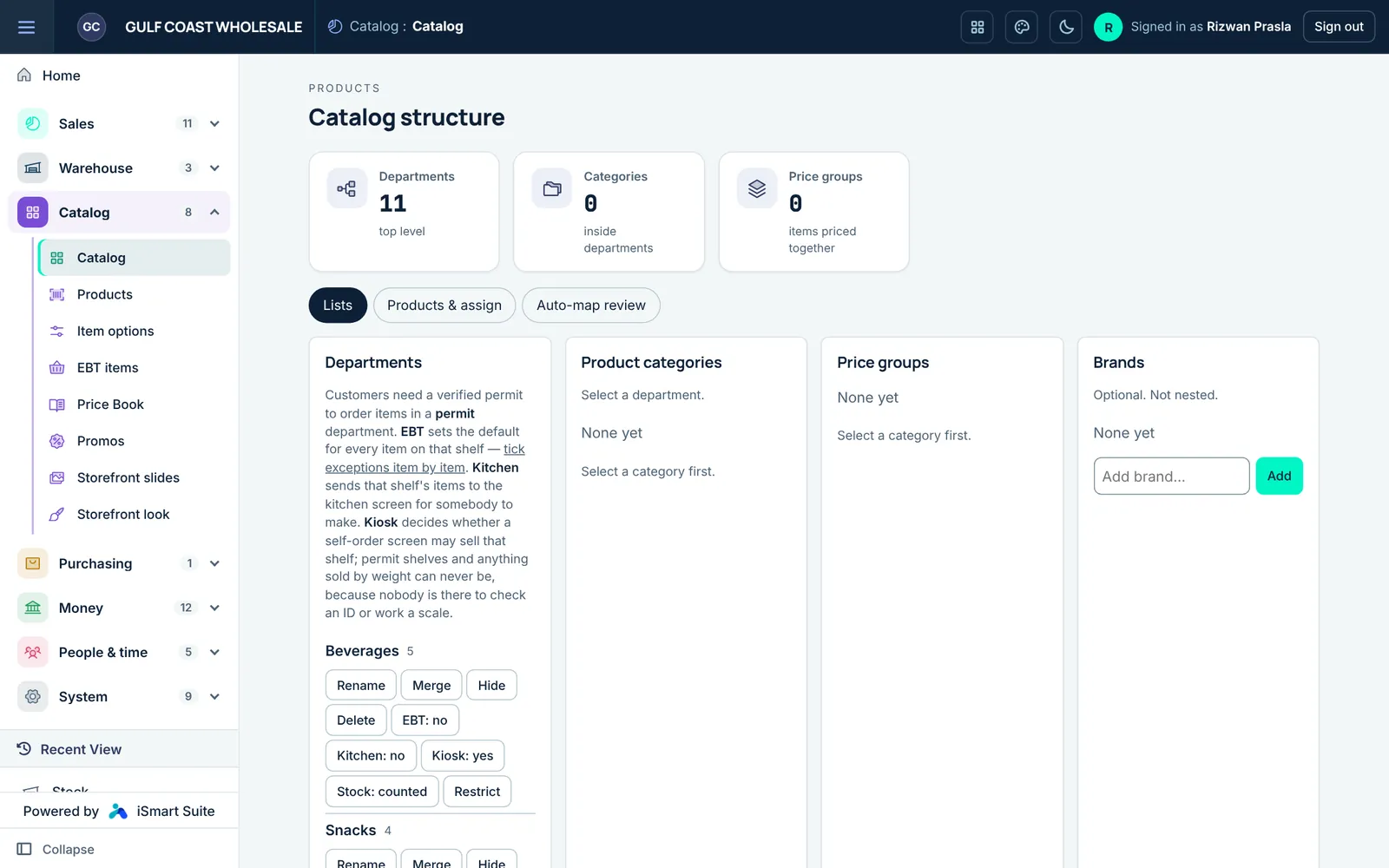
Catalog → Catalog → ListsAdd each department your business actually uses
Use the words your staff already say. A department nobody recognises is a department nobody files things under.
Where:
Catalog → Catalog → Lists → the department → RestrictPress Restrict on any shelf that needs a permit, such as Vape or Tobacco
THIS IS THE COMPLIANCE SETTING. Customers must have a verified, unexpired permit before they can order anything on a restricted shelf.
Set EBT, Kitchen, Kiosk and Stock for each department
These are defaults for everything on the shelf, so you set them once instead of on two thousand products. Individual items can still differ.
Add categories under a department, then price groups under a category
Categories and price groups are what reporting groups by. Without them, every report is a flat list of product names.
Watch out for
- A permit shelf can never be sold on a self-order kiosk, no matter what the kiosk setting says. Nobody is standing there to check an ID.
- You can only delete a list entry that has no products and no children. Rename or Merge handles everything else, and Merge keeps the products.
- Importing products whose department does not exist yet will not create it. The import stops and tells you which ones are missing.